
People were building these “chief of staff” agents that check your repos, read your tickets, and put together a daily to-do list. I wanted something like that for my client projects. I already had separate dev machines for the clients, with Claude and the project tools set up on each one. So I put a Java server on a cheap VPS and had it connect to those machines to pull together a report.
Now I get one Slack message every weekday morning. Sprint tickets, open pull requests, a score out of ten for each PR, and a short explanation. If a PR needs my review and the build isn’t red, there’s an Approve button. I tap it from my phone and six seconds later the card says approved freight-ws#412 · by @matthew at 8:04. Behind that tap, Slack talks to my server, the server SSHes into the dev machine, and the machine runs the GitHub approve command. It was already logged in.
All it is is a Java server on a EUR 4 VPS, some bash scripts, and Claude at a few points along the way. Data pipelines and old-fashioned ETL, with a bit more room for the wishy-washy parts. Basically cron with a human attached.
Getting the information into Slack was only part of it. Getting a report I actually wanted to read took more work. A bot saying “7 out of 10” is mostly useful. I also want to know why it’s not a ten.
These are the eight decisions behind the system. The code is private tooling, so the images are mock-ups using two made-up projects: Freight, a search migration on GitHub, and Ledger, a legacy banking migration on Bitbucket Cloud.
Decision 1: What Goes on the Card?
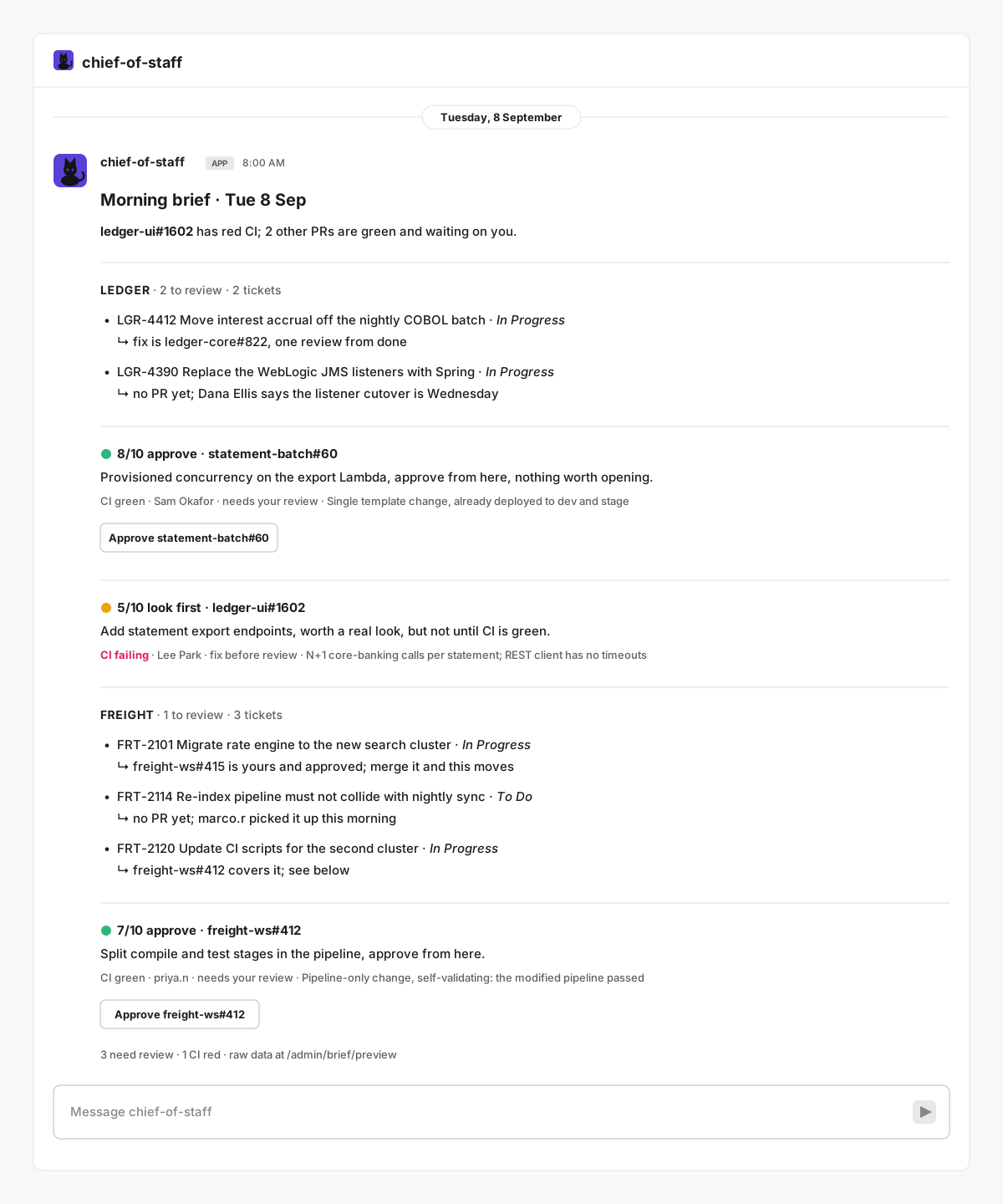
The first version included repo hygiene metrics. I cut those. I wanted to open the message and see what I had to do next: review a PR, answer a comment, or check a ticket that’s blocked.
A list of PR links would have been easy. But I already get those in email. What I wanted was a quick review: what is this change, why did it get that score, and what’s the main objection?
When Nina and I talked about this on the podcast, that was still the frustrating part. The bot would complain about something handled in another repo, or reduce a review to a vague architecture concern. I’d be looking at it thinking, okay, what is the actual architecture problem? The explanation had lost the context that made it useful. That’s the part I keep coming back to when I work on the brief.
Here’s an illustrative version of the difference:
| Summary | What it tells me |
|---|---|
| Weak | ”6/10. Some architecture concerns.” |
| Useful | ”6/10. The title says comment cleanup, but this PR also adds a database migration and changes status handling.” |
The second one gives me somewhere to start when I open the diff. The first one leaves me guessing what bothered it.
The card layout itself is straightforward. My own PR leads with its review state or mine · N comments to address. A PR waiting on me leads with CI failing, the verdict badge, or no verdict yet. Those lines come from rules in the server. Claude supplies the short take underneath.
Only PRs that need my review and don’t have red CI get an Approve button, capped at ten per project. In the mock-up, Ledger’s statement-batch#60 gets one. ledger-ui#1602, with a failing build, doesn’t. Watched repos and comment counts on my own PRs round out the message.
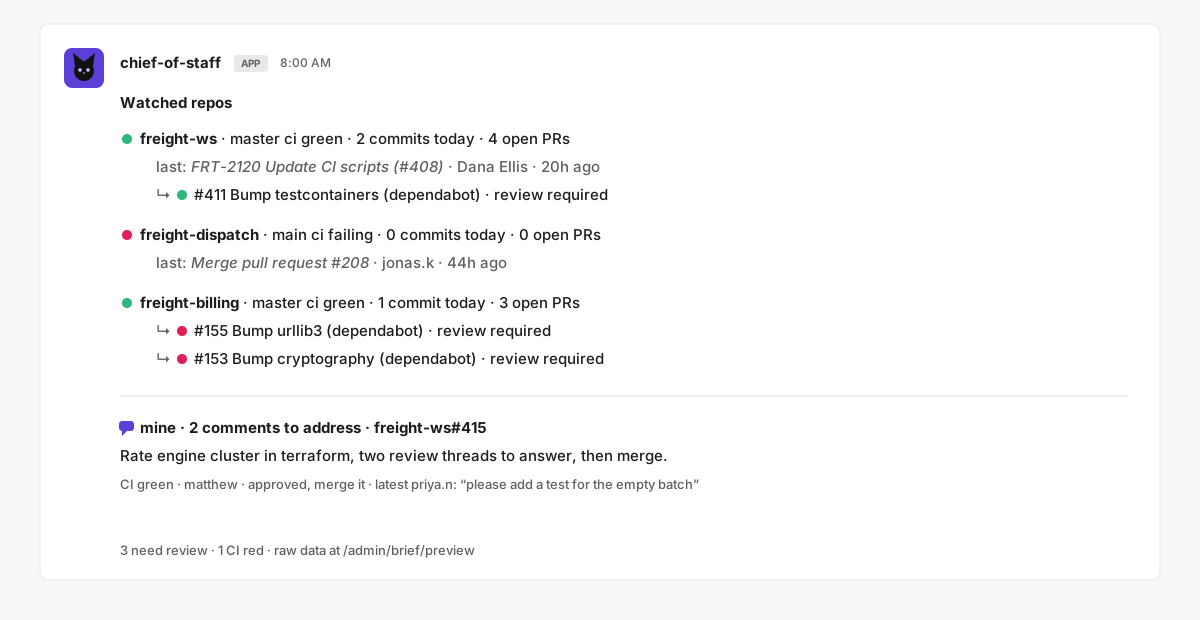
There was also a less interesting problem underneath all this: finding the PRs. GitHub has gh search prs. For Bitbucket Cloud, I ended up sweeping repos pushed to in the last 21 days, plus a cache of every repo that had previously shown a PR for me. In a workspace with a thousand repos, that keeps the sweep bounded. It also means an old PR in a repo I’ve never seen can be missed. That’s a limitation of the brief I have to remember.
Decision 2: When Do You Actually Call an LLM?
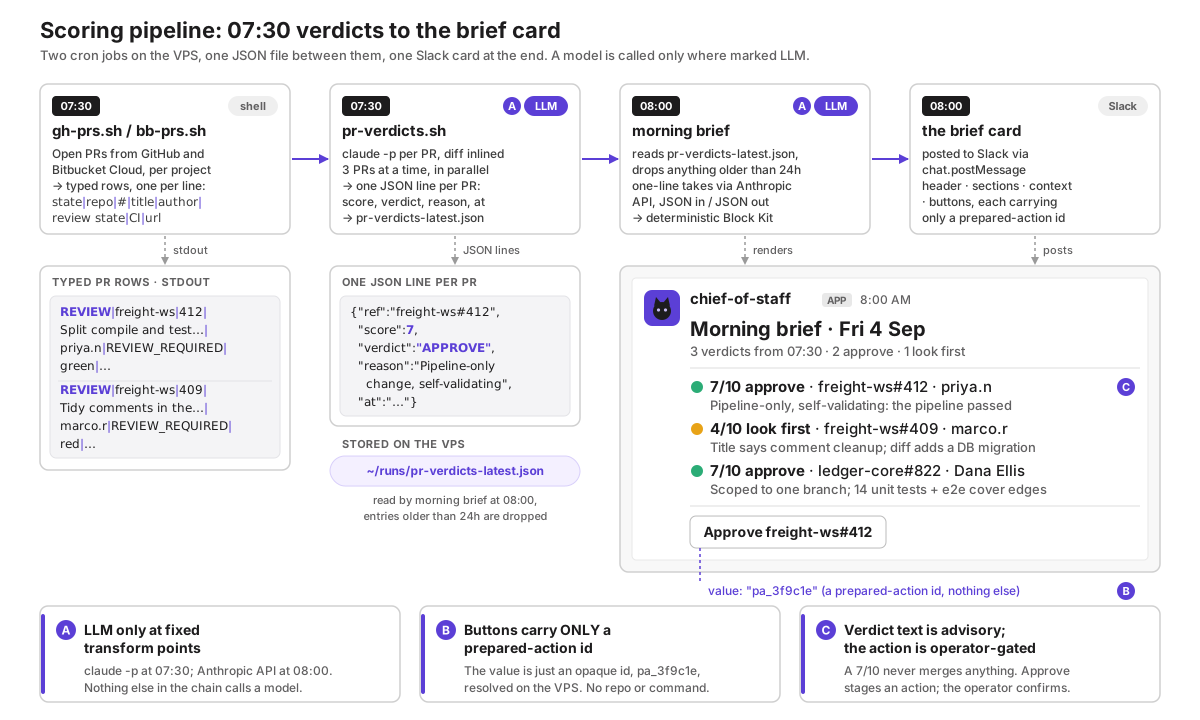
People have been running scheduled jobs forever. I’m comfortable with that part. The server knows when to fetch the tickets, when to gather the PRs, and when to post the message. There are two places in the morning pipeline where I ask Claude to interpret something.
At 07:30, a script on the dev machine fetches the PR diffs and runs Claude Code once per PR. This uses the machine’s Claude Max subscription. The scoring prompt is short:
You are reviewing pull request $REF for Matthew, a senior engineer who is a requested reviewer. Decide whether he should approve it AS-IS.
Score 0-10 (10 = trivially safe to approve).
verdict: APPROVE if score>=7, LOOK if 4-6 (needs a real read), HOLD if <=3.
reason: max 22 words, concrete.
The score and reason appear together on the card. The reason is what helps me decide how closely to look. The score doesn’t approve anything.
At 08:00, the server gathers each project’s sprint, PRs, watched repos, and stored verdicts. It sends that fact list to the Anthropic API for a headline and a short take per item. The response is JSON, so the server can put each take next to the right record and build the Slack message.
There is one other place I talk to a model: the chief channel in Slack. A message like freight: what's blocking FRT-2114? goes to that project’s persona. It can read tickets and PRs, and prepare a few kinds of change for approval. It gets eight tool iterations and a fixed tool list. Without a project prefix, the message goes to a chief persona with read tools only.
Keeping the handoffs structured helps, but it doesn’t solve the context problem from the first section. An explanation can be perfectly valid JSON and still tell me nothing. The review needs the project’s context, and the short version needs to preserve the actual objection.
I also had a reply get truncated, which left the brief falling back to raw PR descriptions. The takes call now has a larger output budget and a parser that salvages complete key-value pairs from a partial reply. If that call fails after three attempts, the brief uses titles. If a verdict can’t be parsed, it stays missing. I can still read the tickets and PRs without the commentary.
Decision 3: Where Do the Credentials Live?
I already had dev machines logged in to the services I needed. They could read Jira, talk to GitHub or Bitbucket, and run Claude Code. So I put the scripts there.
Every Jira, forge, and Claude Code call runs on the dev machine, which I’ll call the box from here on. Most go through scripts in ~/tasks/; a few are one-line gh or claude -p commands. The VPS reaches the box over SSH on a Tailscale tailnet. It holds the Slack tokens, Anthropic API key, and SSH private keys. The existing service tokens stay on the box.
I wanted the box side to stay simple: a directory of scripts, with the orchestration in the Java service. Each project gets a config file that tells the server where to connect and what to look at:
# projects/freight/project.yml
boxHost: 203.0.113.10           # example address; use your box's tailnet address
sshUser: matthew
jiraProjectKey: FRT
githubOrg: freight-platform     # or bitbucketWorkspace: ledger-platform
slackChannel: C0EXAMPLE
watchedRepos: [freight-dispatch, freight-billing]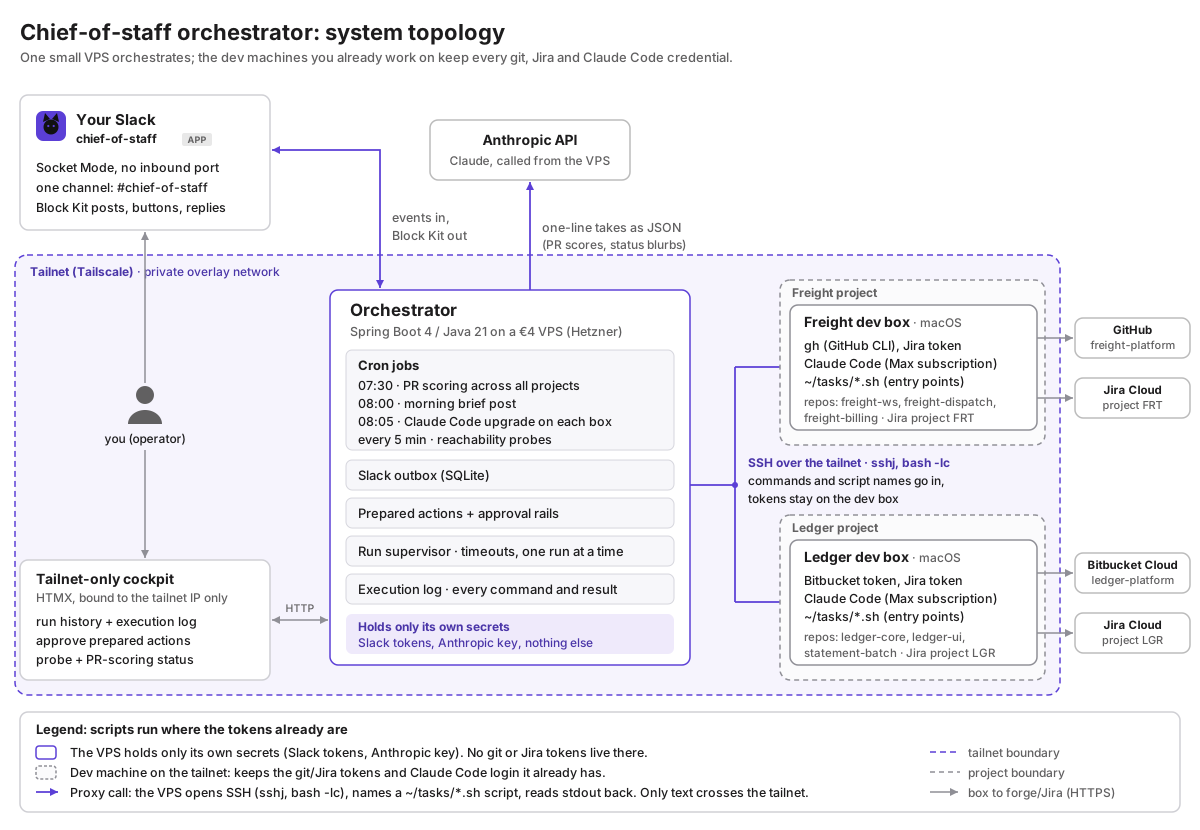
The awkward part is the SSH key. It opens a shell on the box, so anyone who owns the VPS effectively owns that access too. Mine is on a private tailnet with no public port. A dedicated SSH user, a wrapper restricting which commands the key can run, and tighter tailnet access rules are still on my list. Keeping tokens in one place doesn’t remove that problem.
There were smaller annoyances too. My box uses fish, so remote commands get wrapped in bash -lc. Prompts and PR titles cross as base64. The Mac’s older bash and lack of GNU timeout needed a little extra handling in the scripts. This is the sort of work you pick up when you use the machine you already have.
Decision 4: How Does a Mutation Get Approved?
Say I ask the Ledger persona to move LGR-88 to Done because Lee confirmed the fix. It prepares the transition and sends me a card showing the command and an approval button.
Behind that card is a row in prepared_actions: the project, the action type, its payload, and a status starting at PENDING. The button carries only the row’s id. When I tap it, the server checks my Slack user id, claims the row, reads and validates the payload again, then executes the action. A click from anyone else gets a private refusal.
The claim is a database update that only succeeds while the row is PENDING. That gives one winner if I double-tap or Slack delivers the interaction twice. The next section covers the same pattern for job state.
The validation belongs in code. Issue keys have to match the expected format. Branch names are normalized before checking them, and protected names such as main, master, and develop are refused for the branch actions. The persona’s write tools create pending actions; the executor is what runs them after approval.
For persona requests, I see the command before I tap. The morning brief skips that preview because its button always means the same thing: approve this PR.
There are a couple of compromises. Most prepared actions expire after an hour, but PR approvals get 24 hours because I might not get to the morning brief until the evening. And if the server crashes during execution, the row can stay APPROVED with no automatic retry. That needs attention and a fresh action. The button makes the normal case convenient; there are still failure cases to deal with.
Decision 5: What State Do You Keep?
One person uses this. SQLite is enough for the runtime state, and I don’t need another database service to look after. It tracks runs, approvals, outgoing Slack messages, and what the system did overnight. Configuration stays in git; logs and Claude sessions stay on the box.
The part that took care was coordinating updates. One task might see a run finish while another decides it’s stale. Each update checks the state it expects, and only the one that changes the row gets to announce it in Slack. The database also enforces one active run per thread. A review before the first deploy caught the race in checking for a run and then inserting one.
I wanted to be able to look up what happened without piecing it together from Slack threads. Keeping the state and execution log together gives me that.
Implementation notes: database and execution log
The application uses plain SQL through Spring’s JdbcClient, with one pooled connection to serialize database access. This index enforces one active run per Slack thread:
CREATE UNIQUE INDEX IF NOT EXISTS idx_runs_one_active_per_thread
  ON runs(slack_thread_ts)
  WHERE slack_thread_ts IS NOT NULL
    AND state IN ('QUEUED','RUNNING','WAITING_BOX','WAITING_PROVIDER');
The execution log records what triggered a command, the project, arguments, duration, and outcome. A nightly job prunes the log and backs up the database through SQLite’s online backup API.
Decision 6: How Does Slack Shape the Interaction?
Slack is where I already am, and the buttons work from my phone. That was enough reason to use it. Making the message feel usable took a few goes.
The first brief was a wall of text. I tried four layouts and settled on one card per PR. Then I spent a day on three versions of the approve click. Slack’s spinner disappears as soon as the click is acknowledged, while the command on the box can still be running. I still need to know whether anything is happening.
So the card becomes the progress indicator. The button changes to approving freight-ws#412, then to the result when the box replies. The work happens in the background while the interaction gets acknowledged promptly.
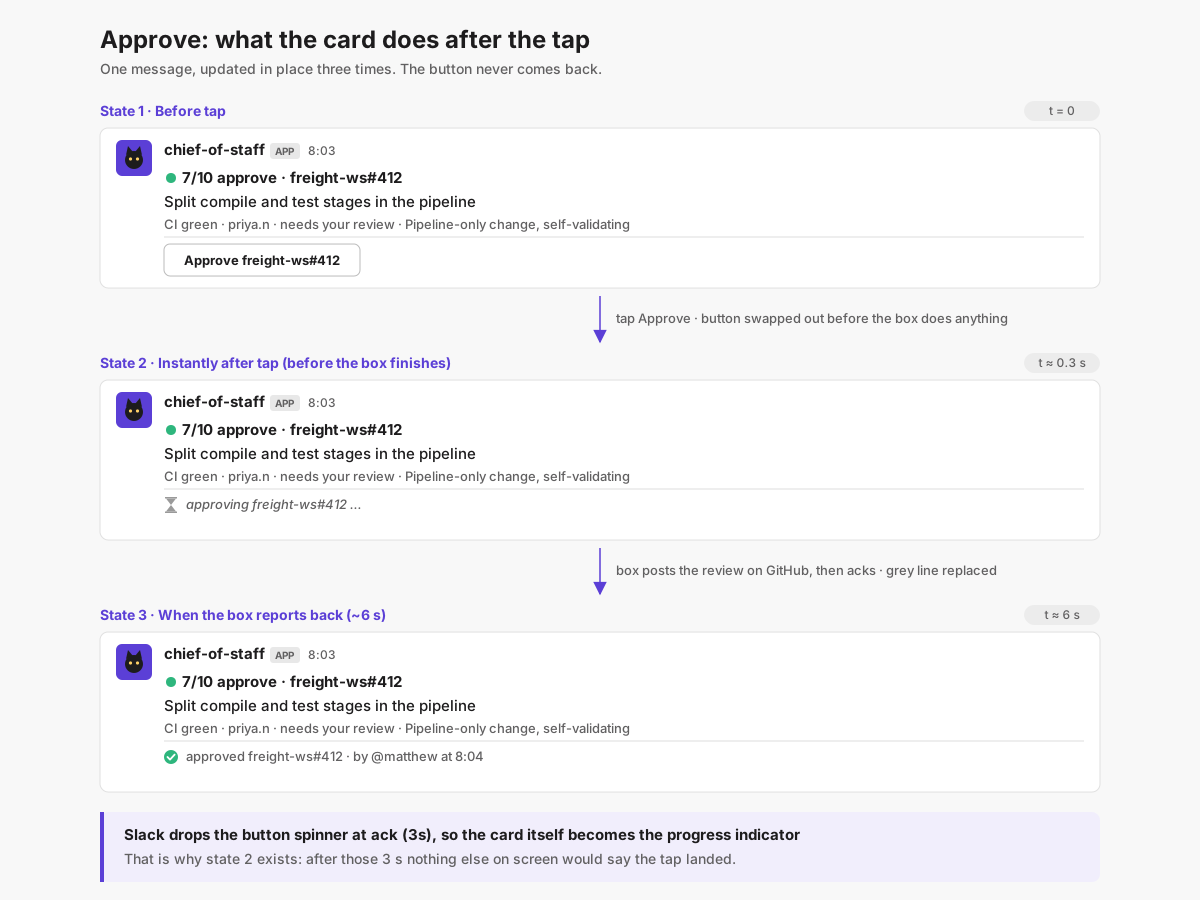
Slack also limits how much fits in a message. When the brief gets too long, the cards collapse to a simpler layout, with a footer saying if anything was omitted. That’s another reason to keep it focused on what I need to do next.
Implementation notes: Slack limits and delivery
Slack expects an acknowledgement within three seconds and allows 50 blocks per message; I budget 48. Two quick approvals on the same message have to preserve each other’s changes, so the server reads the current blocks under a lock for that message before updating them. If the update fails, it falls back to a reply in the thread.
The connection uses Socket Mode because I didn’t want a public endpoint. Outgoing messages go through a SQLite outbox, which sends up to ten rows every ten seconds. A row that fails twenty times gets parked as FAILED. That gives delivery a chance to recover from a short outage, though it isn’t an indefinite retry policy.
Decision 7: How Do You Run a Two-Hour Job on Another Machine?
A morning brief is a short job. A headless coding run can take two hours, and I don’t want its lifetime tied to an SSH connection.
The server launches a detached tmux session on the box. A script runs Claude Code, keeps the log, and writes an exit file when it finishes. The server checks on it periodically. The box decides whether Claude starts fresh or resumes a session.
The awkward cases are around launch. An SSH reply can get lost after tmux has started. A server restart during that exchange can leave the database thinking the job is still queued. Those cases needed an existing-session check and a recovery pass for stranded rows. “Start a command and check on it later” sounds simple until the two machines disagree about whether it started.
Implementation notes: polling and recovery
The exit file is written to a temporary path and renamed into place, so the poller won’t read half a result. The server checks once a minute:
exit file present  -> read the exit code and log tail
tmux session alive -> still running
neither            -> wait a second and check the exit file again
still nothing      -> report the run as gone
The second check handles a run finishing between the first two checks. Small detail, but otherwise an ordinary completion can look like a vanished job.
A session marker tells the script whether to start Claude fresh or resume. An existing tmux session is treated as a successful launch, and queued database rows older than five minutes get a recovery pass.
When a run fails, the exit code and log tail determine what happens next. A provider limit parks the run with increasing delays, capped at thirty minutes. An authentication error alerts me. A timeout, a killed process, and a failure in the task itself get their own categories.
Decision 8: What Happens When Something Is Down?
There are plenty of things this depends on: the box, Jira, two forges, the model, and Slack. I wanted temporary outages to create as little extra work for me as possible.
New jobs wait if the box is unavailable or its environment check fails. Jobs already running are left alone when the server loses contact. The tmux session may still be working; losing contact doesn’t tell me whether the job failed.
For the morning brief, each project’s data collection can fail independently. If GitHub is down, Freight gets a warning and Ledger can still appear. If the model fails, titles stand in for takes. If Slack is unavailable, the outbox handles delivery attempts. A failed approval call needs attention rather than an automatic replay.
Some of this still ends with me at a keyboard. If the credentials on the box need fixing, parking the work is about all the orchestrator can do. I’d rather find the work waiting with a reason attached than have to work out where it went.
Implementation notes: dependency checks and alerts
Before a coding job starts, the environment check verifies the tools, gh auth status, and the Jira token. A separate probe checks reachability every five minutes and requeues parked runs when the box comes back.
A box going down gets a notification when its status changes. A run waiting for a long time gets one note. Authentication failures and hard timeouts need my attention. After each brief, the server pings an external deadman check so something outside it can notice if the whole pipeline stops.
What I Got Out of It
The first build was about 5.7k lines of Java, thirteen bash scripts, and 160 tests, written in the week after I worked through the requirements. I used Java 21 and Spring Boot because that’s what we use at Katyella. The tests cover the JVM side; the box scripts don’t have automated tests. That’s a gap in this personal tool.
I now have one place to start the morning. The brief gathers the tickets, the reviews, and the comments I owe, and the approval button saves a trip through the browser for the straightforward ones.
Sometimes it complains about something handled in another repo. Then I’m back in the code figuring out what it missed. The message arrived, the JSON parsed, and the score is there, but I still have to do the work of understanding the objection.
That’s where I keep spending time on this. When the explanation has the right context, I can decide where to look next. When it doesn’t, I’ve given myself another thing to investigate before I can decide what to work on.
Build Your Own
If you have one project and a dev machine that’s already logged in, you have a reasonable place to start. Get the raw facts into a morning message first. Then add the review summaries and approval buttons as you work out what you actually use.
I’ve put the starter prompt in a separate text file. It asks about your machines, projects, Slack setup, and approval rules before building in milestones. It covers the brief, approvals, verdicts, and optional coding jobs; the conversational project personas would be a later addition.
The questions matter. Which machine has access, what you’re willing to let run unattended, and where you want to approve changes determine a lot of the design. Work those out before asking an agent to start writing the server.
Multiple forges, machines that regularly disappear, and more than one operator add work. If you’re building this for a team and want help working through those details, get in touch. This is the kind of integration work we do at Katyella.
Related Articles
- AI Code Review for Java: using AI reviews in a Java workflow
- Multi-Agent AI Development Workflows: where multiple agents help
- AI-Assisted Java Development with Claude Code: working with the coding agent on the box
- Spring Boot Consulting: help building around your own stack
Java Modernization Readiness Assessment
15 questions your team should answer before starting a migration. Takes 10 minutes. Could save you months.